
How to Dictate on Mac (2026): Enable Dictation, Shortcut, and System-Wide Options
 UBIK Flow Team
Mac has built-in dictation, but it is not the whole story
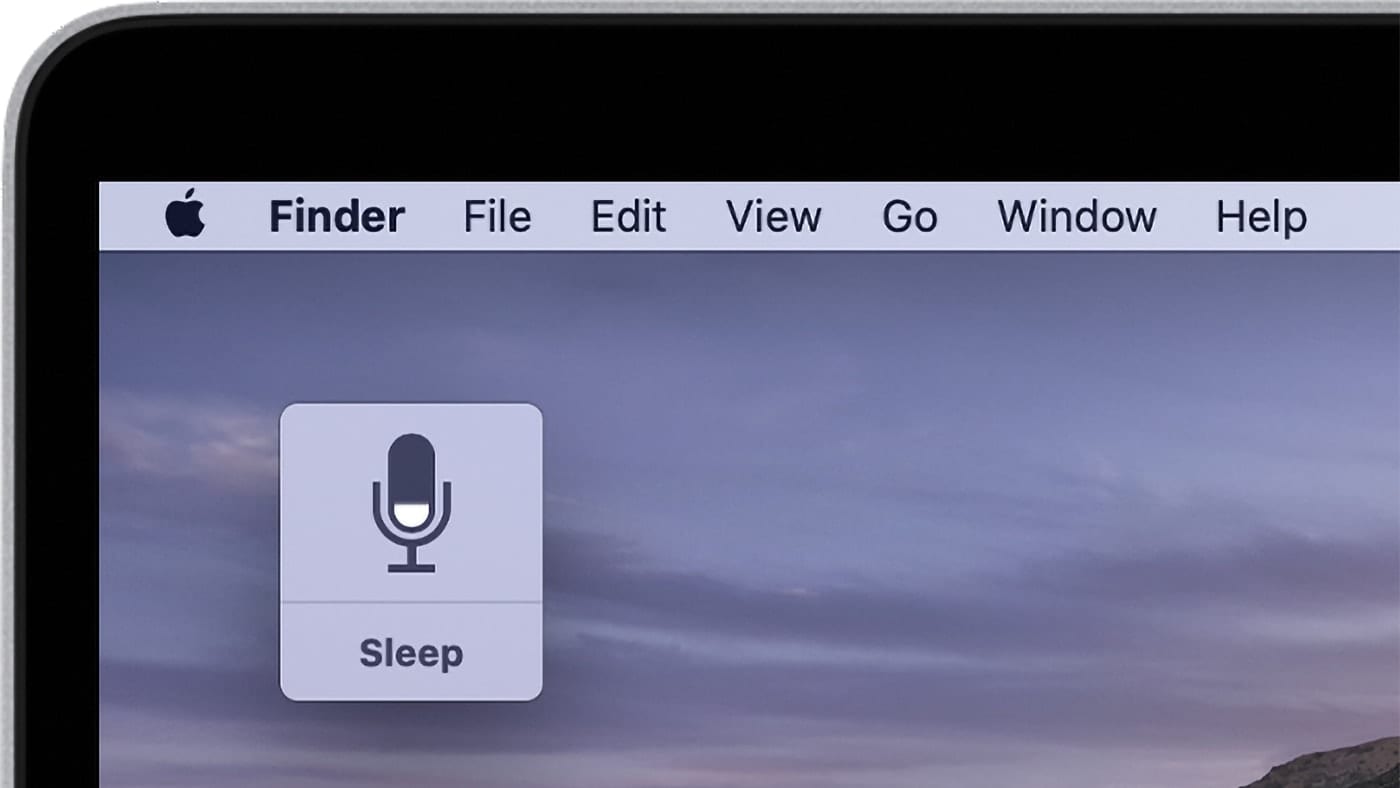
macOS includes Dictation in Keyboard settings. Double-tap your shortcut key, speak, text appears at the cursor in most apps. It works for basic typing. It does not read your screen, draft from a Slack thread, or guarantee the same experience on every corporate Mac.
This guide covers how to dictate on Mac in 2026: enable built-in dictation, the shortcut, where it breaks, and when UBIK Flow is the better fit for daily work across apps.
Quick answer
Built-in Mac dictation: System Settings → Keyboard → Dictation → On. Open any text field, use your dictation shortcut (often double-press Fn), speak, text lands at the cursor.
For screen-aware drafts across apps: UBIK Flow. Two shortcuts.
- ⌘⇧O (dictate): your words at the cursor in Slack, Gmail, Notion, Word, and any text field.
- ⌘⇧T (agent): AI draft from what is on screen (email thread, doc, Slack channel).
To test your mic: Speech to text in your browser, free, no account.
Shortcut reference: Dictation shortcut cheatsheet for Mac dictation and UBIK Flow keys.
Do not confuse Dictation with Speak Selection. Speak Selection reads text out loud. That is text-to-speech. Dictation turns your speech into typed text.
What Mac actually offers (and what it does not)
| Feature | What it does | Speech to text at cursor? |
|---|---|---|
| Dictation | Transcribes your voice into the active text field | Yes, in most apps with a cursor |
| Voice Control | Full voice navigation of macOS (open apps, click, scroll) | No. Accessibility control, not typing assistance |
| Speak Selection / Spoken Content | Reads selected text aloud | No. Text-to-speech, not speech-to-text |
| Siri | Voice commands and questions to Apple's assistant | No. Not a general dictation tool for any text field |
macOS dictation usually sends audio to Apple's servers for processing unless your Mac has a local language pack enabled for offline dictation. Do not assume offline dictation on every machine. IT policies may disable dictation entirely.
Key takeaway: Mac Dictation transcribes your words into one field at a time. It does not see your Slack thread, Gmail conversation, or the doc beside your browser.
Why Mac dictation feels limited for modern work
Apple's dictation has been on Mac for years. It does one job: listen, return text, insert at the cursor. That still works for a quick paragraph in Notes or an email body.
It is not built for how people work in 2026.
- No screen context. Dictation does not know what is in your other windows. It cannot draft a Slack reply from the thread visible on screen.
- Inconsistent on managed Macs. Corporate IT often disables dictation, blocks cloud speech, or locks keyboard shortcuts. You may not have the feature at all.
- Cloud dependency. Audio often leaves your Mac for processing. That raises privacy questions and adds delay compared to on-device transcription.
- The technology lags modern tools. Speech recognition improved a lot recently. macOS dictation still runs on Apple's older live-dictation stack, not the kind of cross-app workflow people now expect.
If you dictate a sentence once in a while, built-in dictation is enough. If you dictate all day in Slack, Gmail, and docs, you will feel the gap.
UBIK Flow is built for that second case: transcription on your machine with ⌘⇧O, and drafts that use what is on screen with ⌘⇧T, wherever your cursor is.
How to enable dictation on Mac
Step 1 · ~1 min · Turn on dictation
- Open System Settings (or System Preferences on older macOS).
- Go to Keyboard → Dictation.
- Toggle Dictation to On.
- Choose your language. Add more languages if you switch between them.
Step 2 · ~30 sec · Set the dictation shortcut
Under Shortcut, pick what triggers dictation:
- Press Fn (Function) key twice (common default on MacBooks).
- Press (microphone icon key) on some keyboards.
- Customize to another key if Fn is awkward.
This is your dictation shortcut mac. Test it in a text field before a long session.
Step 3 · ~10 sec · Dictate
- Click in any text field (Mail, Slack, Notes, browser).
- Trigger your dictation shortcut.
- Speak clearly. Watch the microphone indicator.
- Trigger the shortcut again or click Done to stop.
Voice commands on Mac
While dictating, you can say:
| Say this | Result |
|---|---|
| « new line » | Line break |
| « new paragraph » | Paragraph break |
| « cap [word] » | Capitalize next word |
| « no space » | Join with previous word |
| « period » / « comma » | Inserts punctuation |
Commands vary slightly by language. Check Apple's dictation help for your macOS version if a command fails.
Dictation shortcut mac: built-in vs UBIK Flow
| Shortcut | What it does |
|---|---|
| Fn double-press (or your Mac dictation key) | Built-in macOS dictation at cursor |
| ⌘⇧O | UBIK Flow raw transcript at cursor |
| ⌘⇧T | UBIK Flow AI draft from screen context |
See the full list on the shortcut cheatsheet.
When to use UBIK Flow instead of Mac dictation
Mac dictation stops at the edge of the active text field. It cannot use what is on your screen.
| Situation | Mac dictation | UBIK Flow |
|---|---|---|
| Quick note in TextEdit or Notes | Best fit | Works, but dictation is already there |
| Reply in Slack with the spec open | No context from other windows | ⌘⇧O or ⌘⇧T at cursor in Slack |
| Answer Gmail from the visible thread | No | ⌘⇧T drafts from screen |
| Raw transcript, no AI rewrite | Yes | ⌘⇧O |
| AI draft using doc + browser side by side | No | ⌘⇧T sees the screen |
⌘⇧O: dictate (raw transcript)
Your sentence, word for word, at the cursor. No AI rewrite. Works in Slack, Gmail, Notion, Word, Google Docs, and any text field.
- Click in the target field.
- Hold ⌘⇧O. Speak. Release.
- Edit and send or save.
⌘⇧T: agent (draft from screen context)
The AI reads what is visible and drafts at your cursor.
- Put the source on screen (email thread, Slack channel, Google Doc).
- Click where the text should land. Press ⌘⇧T.
- Ask out loud: « Draft a reply based on this thread » or « Summarize the doc on screen in three bullets. »
- Review. Edit.
| Mac dictation | UBIK Flow ⌘⇧O | UBIK Flow ⌘⇧T | |
|---|---|---|---|
| Works in most text fields | Yes | Yes | Yes |
| Sees other windows on screen | No | No | Yes |
| Works when IT disables Mac dictation | No | Often yes | |
| Output | Your speech as text | Your exact words | AI draft from screen |
Test your mic first: speech to text
Four jobs worth doing
-
The quick email. You are in Mail. Built-in dictation for two sentences. Stay in the tool Apple gave you.
-
The Slack reply with context. Spec in one window, Slack in another. ⌘⇧T in Slack: « Answer using the spec on screen. »
-
The Gmail thread response. Thread open in the browser. Click in the reply box, ⌘⇧O for your exact words or ⌘⇧T for a draft from the visible thread.
-
The doc section in Word or Google Docs. Dictate inside the app if you prefer. Switch to ⌘⇧O when your cursor moves to another tool.
Where dictation on Mac breaks
- Dictation toggle is missing or greyed out. Your organization may disable it. Ask IT before relying on Mac dictation for work content.
- Mac dictation not working after an update. Reboot, re-check Keyboard → Dictation, and confirm microphone access in Privacy & Security → Microphone.
- Wrong language. Set the dictation language to match what you speak.
- Shortcut does nothing. Fn may be remapped. Pick a custom shortcut under Keyboard → Dictation.
- No internet. Cloud dictation may fail without a connection. Do not assume offline mode unless your Mac shows a downloaded language pack for local dictation.
- Confused features. Voice Control navigates the Mac. Speak Selection reads text aloud. Neither replaces dictation for typing.
What UBIK Flow does not do
- Does not replace Voice Control for accessibility navigation.
- Does not read your entire hard drive. Only what is visible when you use the shortcut.
- Does not send messages or emails for you.
- Does not require enabling Apple's built-in dictation.
Voice to text in the apps you use on Mac
- Gmail: no native dictation on desktop. UBIK Flow at the cursor.
- Slack: no native voice to text on desktop. UBIK Flow for messages and thread-aware drafts.
- Word: built-in Dictate inside Word only.
- Google Docs: built-in voice typing inside the doc tab only.
Go further with UBIK Flow
Use Mac dictation for a quick line in one field. Use UBIK Flow when your work spans apps or needs screen context. ⌘⇧O for your exact words. ⌘⇧T when the answer needs what is on screen. Test your mic with speech-to-text and review shortcuts on the cheatsheet.
FAQ
How do I dictate on Mac?
Enable System Settings → Keyboard → Dictation, click in a text field, trigger your dictation shortcut, speak, stop when done.
How do I enable dictation on Mac?
System Settings → Keyboard → Dictation → On. Choose your language and shortcut. Allow microphone access when macOS prompts you.
How do I turn on dictation on MacBook?
Same path on MacBook Air and MacBook Pro: System Settings → Keyboard → Dictation → On. Set the shortcut (often double-press Fn).
What is the dictation shortcut on Mac?
The default is often double-press Fn. You can change it under Keyboard → Dictation → Shortcut. UBIK Flow uses ⌘⇧O and ⌘⇧T separately.
How do I use speech to text on Mac?
Built-in: enable dictation, use the shortcut in any text field. For speech to text mac across Slack, Gmail, and other apps with screen context, use UBIK Flow.
Is Mac dictation the same as voice to text?
Yes for built-in dictation: both mean speech becomes typed text. People also search mac voice to text, speech to text mac, voice typing mac, and macos dictation. All refer to the same Keyboard dictation feature or third-party tools like UBIK Flow.
Is Mac text to speech the same as dictation?
No. Text to speech reads existing text aloud (Speak Selection). Dictation turns your voice into new typed text.
Why is Mac dictation not working?
Check dictation is enabled, microphone permissions, internet (for cloud dictation), language settings, and whether IT disabled the feature. Try a custom shortcut if Fn does nothing.
Does Mac dictation work offline?
Often no. Standard dictation usually needs a network connection. Some Macs support offline dictation with a downloaded language pack. Check Keyboard → Dictation on your machine. Do not assume offline on a managed work Mac.
How do I dictate in Slack on Mac?
Slack has no native desktop dictation. Click in the message box, hold ⌘⇧O in UBIK Flow, speak, release. For a draft from the visible thread, use ⌘⇧T.
Is Mac dictation private?
Apple processes dictation audio according to its privacy policy, often in the cloud. Check your organization's policy before dictating sensitive content. UBIK Flow ⌘⇧O can run on-device depending on your setup.
What is the difference between ⌘⇧O and ⌘⇧T in UBIK Flow?
⌘⇧O transcribes your voice. Your words, not an AI rewrite. ⌘⇧T talks to the agent with screen context and drafts text at the cursor.
Can I use voice to text on Mac for free?
Built-in Mac dictation is free with macOS. UBIK Flow adds system-wide dictation with screen context. Test your mic with speech-to-text before a long session.
Written by
UBIK Flow Team
Practical guides on prompts, voice input, and AI workflows for knowledge workers.